
The 400 Bad Request is an error which occurs when a request is sent to the website is incorrect or corrupt, and the server receiving the request can’t understand it. This error occurs often by entering wrong URL in the address bar.
400 Bad Request Error is a Hypertext Transfer Protocol (HTTP) code which means the server cannot or will not process the request sent to the website server due to something that is to be a client error for example, malformed request syntax, invalid request message framing, or deceptive request routing.
Note: 400 Bad Request errors, like all other errors of this type, could be seen in any operating system and in any browser.
Table of Contents
What Is a 400 Bad Request Error?
The HTTP 400 Bad Request response status code indicates that the server cannot or will not process the request due to something that is perceived to be a client error.
Common causes of a 400 Bad Request error includes Syntax Errors, Invalid Parameters, Unsupported Request Method, Request Size Too Large, Invalid Content Type.
When troubleshooting this error, it’s essential to carefully review the request and identify the issue causing the error.
This often involves checking the request headers, parameters, and payload for correctness. Additionally, reviewing the server logs can provide insights into the specific nature of the error.
400 Bad Request Errors on different browsers
This error appears different on different browsers/ websites, so you might see something below listed instead of just 400 or something like below:
- 400 Bad Request
- Bad Request. Your browser sent a request that this server could not understand.
- Bad Request – Invalid URL
- HTTP Error 400 – Bad Request
- Bad Request: Error 400
- HTTP Error 400. The request hostname is invalid.
- 400 – Bad request. The request could not be understood by the server due to malformed syntax. The client should not repeat the request without modifications.
These error message occurs in the internet browser window just like web pages do. often you can do something to fix this error but figuring the exact issue is the challenging part of the error.
How to Fix the 400 Bad Request Error
Fixing a “400 Bad Request” error involves identifying and addressing the issue that caused the server to reject the client’s request Here are some common ways to resolve the error:
Check for errors in the URL:
The most common reason for a 400 error is because the URL was typed wrong or the link that was clicked on points to a malformed URL with a specific kind of mistake in it.
- Ensure that the URL and any parameters in the request are correct.
- Look for any syntax errors, missing parameters, or special characters that may be causing issues.
Clear Browser Cache:
Clear your browser’s cookies, especially if you’re getting a Bad Request error with a Google service. Many sites report a 400 error when a cookie its reading is corrupt or too old might be causing problems. Clear the browser cache and try again.
Disable Browser Extensions:
Browser extensions might interfere with the request. Disable them and see if the issue persists.
Try Another Network:
If the 400 error is happening on nearly every website you visit, the problem most likely lies with your computer or internet connection.
Network issues can sometimes cause problems. Try accessing the site from a different network or using a VPN.
Update Browser:
Ensure that you are using the latest version of your browser. Outdated browsers might have compatibility issues.
Flush Your DNS:
Your system might be storing outdated DNS records that are causing the errors. A simple flushing of your DNS records might help solve the problem.
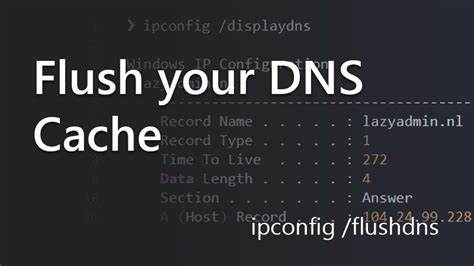
It’s easy to do and won’t cause any problems to try. Use the below command to Flush your DNS.
For Windows:
- Open the Command Prompt with administrative privileges.
- Type the following command and press Enter:
ipconfig /flushdnsFor macOS:
- Open the Terminal application. You can find it in Applications > Utilities or use Spotlight (Command + Space, then type “Terminal”).
- Type the following command and press Enter:
sudo killall -HUP mDNSResponderContact the Website:
If you can’t resolve the issue using the above steps, consulting the website’s support or the server administrator might be necessary to get more specific guidance.
To contact the website through a contact us page (if that works) or through social media. Chances are, they are already aware of the problem and working on fixing it.
Conclusion
In conclusion, a “400 Bad Request” error is an HTTP status code that indicates the server cannot process the client’s request due to issues such as syntax errors, invalid parameters, or other client-side errors.
Resolving this error involves identifying and addressing the specific problem causing the request to be deemed bad. Common troubleshooting steps include checking the URL and parameters, clearing browser cache, trying using another network, flushing your DNS, and ensuring proper network connectivity.
Ultimately, the resolution steps may vary depending on the web application or server configuration, and attention to specific details in the error message and logs is crucial for an effective solution.
If you are interested in hosting website, check out our website for the best Joomla Hosting service.